Add Pharia SDKs to your project
Add the SDKs to your project dependencies
The Pharia Inference SDK, Pharia Studio SDK and Pharia Data SDK are available on PyPI and can be installed using any Python package manager of your choice (pip, poetry, pipenv, uv, etc.).
You can simply install them to your project via:
pip install pharia-inference-sdk
pip install pharia-studio-sdk
pip install pharia-data-sdk
Set your environment variables
Your environment needs to provide the following values:
AA_TOKEN=<YOUR_STUDIO_TOKEN>
STUDIO_URL="https://pharia-studio.{ingressDomain}"
CLIENT_URL="https://inference-api.{ingressDomain}"
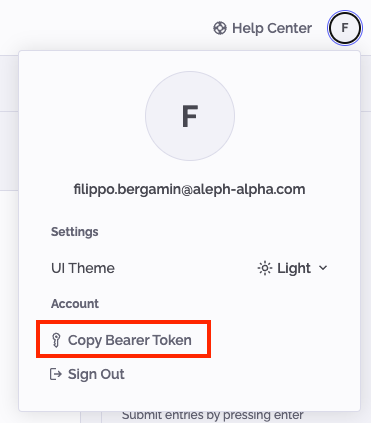
To obtain a valid token, it is sufficient to log in to Studio, access the user menu from the user avatar in the top right corner and click on the Copy Bearer Token button.
Add Intelligence Layer to your Poetry project
For convenience and easier installation, the Intelligence Layer has been split into three separate SDKs:
- Pharia Inference SDK - contains the
coremodule of the Intelligence Layer - Pharia Studio SDK - contains the evaluation modules and everything needed to connect your project to Pharia Studio
- Pharia Data SDK - provides Document Index capabilities and connection to the Pharia Data service
This documentation primarily references these three separate Pharia SDKs, though the same functionality remains available in the original Intelligence Layer.
Prerequisites for installation
The Intelligence Layer uses poetry as its package manager to handle dependencies and manage virtual environments.
We recommend installing poetry globally while isolating it in a virtual environment using pipx, following the official instructions.
Installation Steps
- Install Poetry if you haven't already.
- Change directory to where you want to create your project
- Create a new Poetry project
poetry new poetry-demo
- Navigate to the project directory and run the following command to create a new virtual environment and install all project dependencies:
poetry install
- Activate the environment using:
poetry env activate
For further details, check out the official poetry documentation.
Add the SDK to your project dependencies (JFrog)
If you don't have a JFrog account, please go to Add the SDK to your project dependencies (GitHub)
To install the Intelligence Layer from the JFrog artifactory in you project, you have to add this information to your poetry setup via the following four steps.
- Add the artifactory as a source to your project via
poetry source add --priority=explicit artifactory https://alephalpha.jfrog.io/artifactory/api/pypi/python/simple
- To install the poetry environment, export your JFrog credentials to the environment
export POETRY_HTTP_BASIC_ARTIFACTORY_USERNAME=your@username.here
export POETRY_HTTP_BASIC_ARTIFACTORY_PASSWORD=your-token-here
- Add the Intelligence Layer to the project
poetry add --source artifactory intelligence-layer
- Execute the poetry installation to add all the necessary dependencies to the environment
poetry install
The Intelligence Layer is now available as a Python package and ready to be used in your project.
from intelligence_layer.core import Task
Add the SDK to your project dependencies (GitHub)
To install the Intelligence Layer from the GitHub in you project, run the following command:
poetry add git+https://github.com/Aleph-Alpha/intelligence-layer-sdk.git --python ">=3.10,<3.13"
Add the SDK to your project dependencies (local)
To install the Intelligence Layer in you project, you can also clone the repository locally and add the development dependency on your poetry project.
- Clone the Intelligence Layer repository from GitHub in any directory.
git clone https://github.com/Aleph-Alpha/intelligence-layer-sdk.git
- In your Poetry project directory, open the
pyproject.tomland add the Intelligence Layer as a dependency.
[tool.poetry.group.dev.dependencies]
python = ">=3.10,<3.13"
intelligence-layer = {path = "path/to/git/folder/intelligence-layer-sdk/", develop = true}
- Refresh the lock file and afterwards run the installation for the project with the following instructions.
poetry lock
poetry install
Set your environment variables
For this tutorial, your environment needs to provide the following values:
AA_TOKEN=<YOUR_STUDIO_TOKEN>
STUDIO_URL="https://pharia-studio.{ingressDomain}"
CLIENT_URL="https://inference-api.{ingressDomain}"
To obtain a valid token, it is sufficient to log in to Studio, access the user menu from the user avatar in the top right corner and click on the Copy Bearer Token.